The Wichita Room AV cart comes with a volume block that will control microphone and speaker volume.
This room 4 table mics and 1 lapel mic. These are set up to operate like a headset in an online meeting setting; they will send sound to the computer for clarity in a Zoom or Teams meeting but will not project volume into the room via speakers. TCIT will assist with the setup of microphones in the room when they are needed. Please return microphones to the base unit at the end of your event.
Sound projected into the room will come from the speakers on the presenter screen. Volume should be adjusted first through the computer that is connected to the screen, and then can be adjusted further from the volume block.
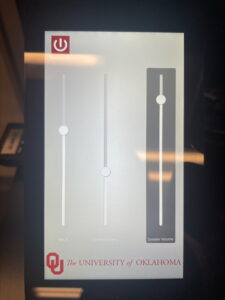
Tap the screen to wake it up, then select the slider for the piece of equipment you wish to adjust:
- Mic 1 – controls the volume of the lapel mic as it sends sound into the virtual meeting. The corresponding microphone has a label that reads “Microphone 1.”
- Conference Mics – controls the volume of the table mics as they project into the virtual meeting.
- Speaker Volume – adjusts the volume of the sound that comes from the screen.
For more help or if you have any questions, please go to the Front Desk or contact TC Support at tcsupport@ou.edu.